mirror of
https://github.com/GeorgeSG/lovelace-time-picker-card.git
synced 2026-09-06 02:18:44 +00:00

167 lines
8.1 KiB
Markdown
167 lines
8.1 KiB
Markdown
# Time Picker Card
|
|
|
|
[![HACS][hacs-shield]][hacs-link]
|
|
[![Downloads][downloads-shield]][downloads-link]
|
|
[![GitHub Release][releases-shield]][releases-link]
|
|
[![CI][ci-shield]][ci-link]
|
|
[![Project Maintenance][maintenance-shield]][maintenance-link]
|
|
[![GitHub Activity][commits-shield]][commits-link]
|
|
[![License][license-shield]][license-link]
|
|
|
|
## Overview
|
|
|
|
This is a Time Picker Card for [Home Assistant](https://www.home-assistant.io/)'s [Lovelace UI](https://www.home-assistant.io/lovelace).
|
|
|
|
Requires an [Input Datetime](https://www.home-assistant.io/integrations/input_datetime/) that has time (`has_time: true`).
|
|
|
|
## Installation
|
|
|
|
Install using [HACS](https://hacs.xyz) or follow this [guide](https://github.com/thomasloven/hass-config/wiki/Lovelace-Plugins)
|
|
|
|
```yaml
|
|
resources:
|
|
- url: /local/time-picker-card.js
|
|
type: module
|
|
```
|
|
|
|
## Usage
|
|
|
|
### Visual Editor
|
|
|
|
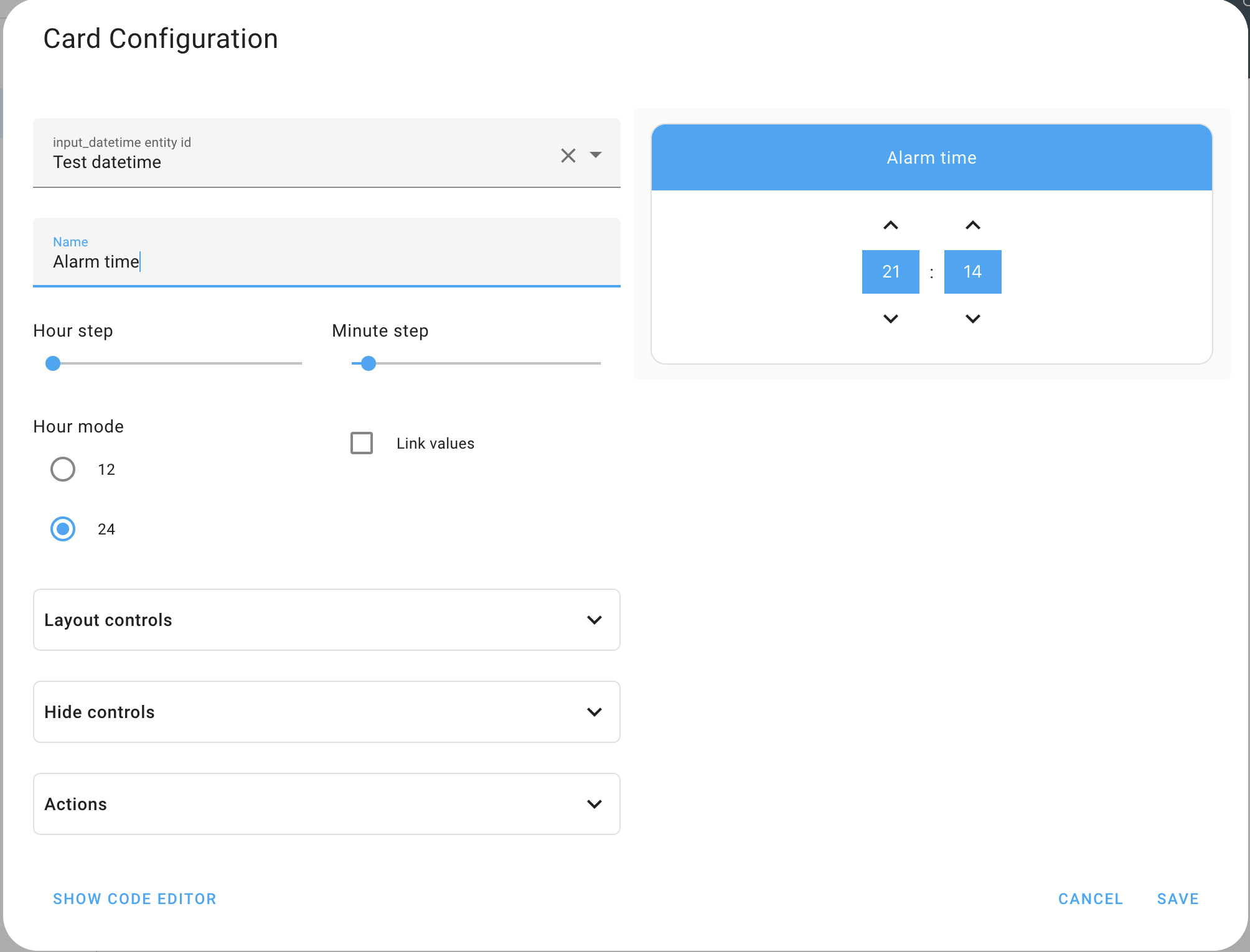
Time Picker Card supports Lovelace's Visual Editor. Click the + button to add a card and search for time picker.
|
|
|
|
|
|
|
|
### YAML
|
|
|
|
```yaml
|
|
type: 'custom:time-picker-card'
|
|
entity: input_datetime.alarm_time
|
|
name: 'Choose a time'
|
|
hour_mode: 24
|
|
hour_step: 1
|
|
minute_step: 5
|
|
hide:
|
|
name: false
|
|
```
|
|
|
|
## Examples
|
|
|
|
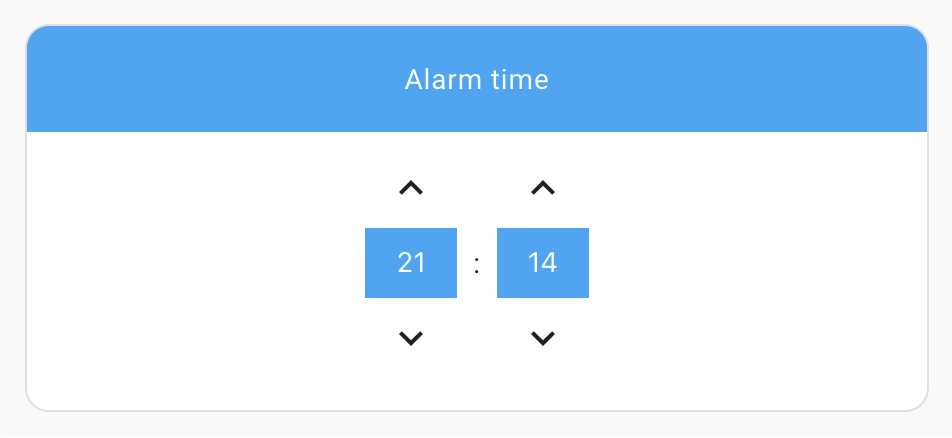
### Default config - card name shown, 24 hour mode
|
|
|
|
|
|
|
|
```yaml
|
|
type: 'custom:time-picker-card'
|
|
entity: input_datetime.alarm_time
|
|
```
|
|
|
|
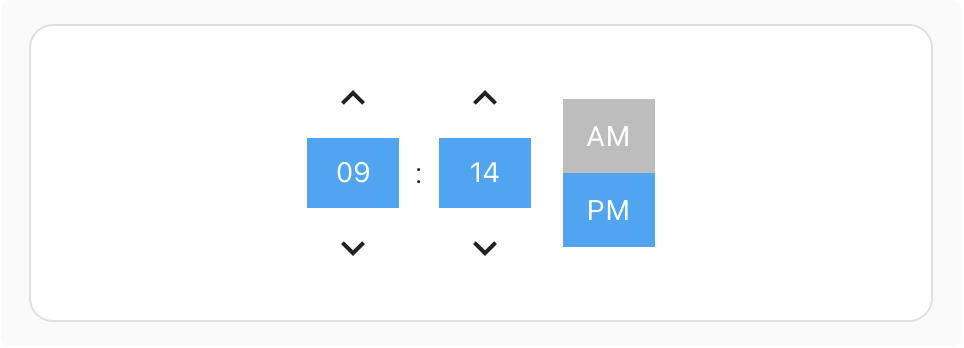
### Custom config - hidden card name, 12 hour mode
|
|
|
|
|
|
|
|
```yaml
|
|
type: 'custom:time-picker-card'
|
|
entity: input_datetime.alarm_time
|
|
hour_mode: 12
|
|
hide:
|
|
name: true
|
|
```
|
|
|
|
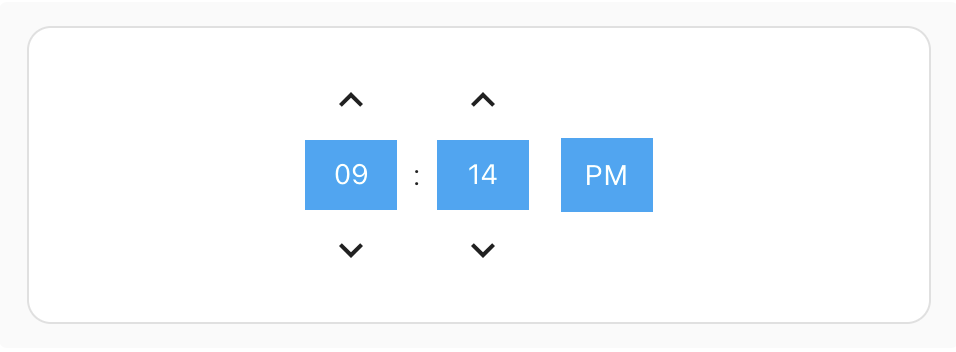
### Custom config - hidden card name, 12 hour mode with a "single" hour mode picker
|
|
|
|
|
|
|
|
```yaml
|
|
type: 'custom:time-picker-card'
|
|
entity: input_datetime.alarm_time
|
|
hour_mode: 12
|
|
layout:
|
|
hour_mode: single
|
|
hide:
|
|
name: true
|
|
```
|
|
|
|
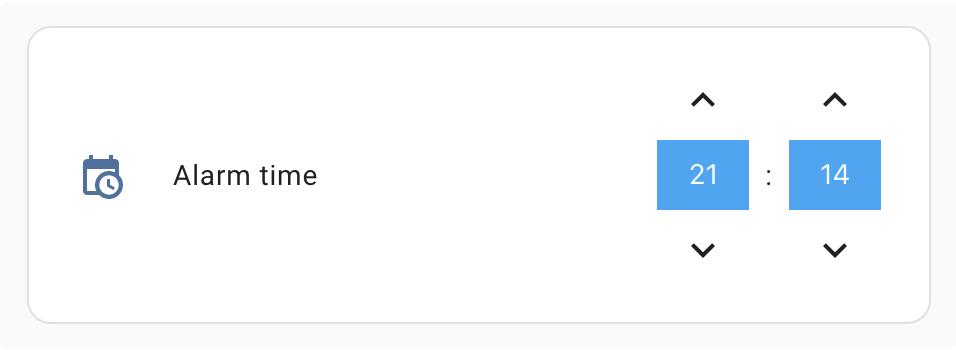
### Custom config - card name inside card and controls aligned right
|
|
|
|
|
|
|
|
```yaml
|
|
type: 'custom:time-picker-card'
|
|
entity: input_datetime.alarm_time
|
|
layout:
|
|
name: inside
|
|
align_controls: right
|
|
```
|
|
|
|
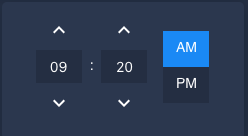
### Using a custom theme
|
|
|
|
|
|
|
|
## Options
|
|
|
|
| Name | Type | Requirement | Description | Default |
|
|
| ----------- | ------------ | ------------ | --------------------------------------------------------------------------------------------------------- | ------------------------ |
|
|
| type | string | **Required** | `custom:time-picker-card` | |
|
|
| entity | string | **Required** | [Input Datetime](https://www.home-assistant.io/integrations/input_datetime/) entity with `has_time: true` | |
|
|
| name | string | **Optional** | Card name | Entity's `friendly_name` |
|
|
| hour_mode | `12` or `24` | **Optional** | Hour format. If `12`, card will show AM/PM picker | `24` |
|
|
| hour_step | number | **Optional** | Hour change when clicking arrows | `1` |
|
|
| minute_step | number | **Optional** | Minute change when clicking arrows | `5` |
|
|
| layout | object | **Optional** | Card Layout configuration | `none` |
|
|
| hide | object | **Optional** | Hide object | `none` |
|
|
|
|
## Layout Object
|
|
|
|
| Name | Value | Requirement | Description | Default |
|
|
| -------------- | ------------------------- | ------------ | -------------------------------------------------------------------------------------------------- | -------- |
|
|
| hour_mode | `single`, `double` | **Optional** | Whether to show both AM/PM or just the current mode. In `single` mode, tap the value to change it. | `double` |
|
|
| align_controls | `left`, `center`, `right` | **Optional** | Horizontal alignment of the controls | `center` |
|
|
| name | `header`, `inside` | **Optional** | Whether to show the name as a header or inside the card | `header` |
|
|
|
|
## Hide Object
|
|
|
|
| Name | Type | Requirement | Description | Default |
|
|
| ---- | ------- | ------------ | ------------------- | ------- |
|
|
| name | boolean | **Optional** | Hides the card name | `false` |
|
|
|
|
## Theme Variables
|
|
|
|
Time Picker Card will automatically pick up colors from your lovelace theme, but if you want to customize some of them,
|
|
you can use the following variables in your theme's config file:
|
|
|
|
| Name | Default | Description |
|
|
| ------------------------------------- | ---------------------------- | -------------------------------------- |
|
|
| time-picker-elements-background-color | `var(--primary-color)` | Background color for header and inputs |
|
|
| time-picker-icon-color | `var(--primary-text-color)` | Arrow color |
|
|
| time-picker-text-color | `white` | Text color |
|
|
| time-picker-accent-color | `var(--primary-color)` | AM / PM active color |
|
|
| time-picker-off-color | `var(--disabled-text-color)` | AM / PM inactive color |
|
|
|
|
## Meta
|
|
|
|
**Georgi Gardev**
|
|
|
|
- [gar.dev](https://gar.dev)
|
|
- [![GitHub][github-icon]][github-link] [GeorgeSG][github-link]
|
|
- [![Twitter][twitter-icon]][twitter-link] [@georgesg92][twitter-link]
|
|
|
|
[hacs-shield]: https://img.shields.io/badge/HACS-Default-brightgreen.svg
|
|
[hacs-link]: https://github.com/custom-components/hacs
|
|
[downloads-shield]: https://img.shields.io/github/downloads/GeorgeSG/lovelace-time-picker-card/latest/total?color=brightgreen&logo=github
|
|
[downloads-link]: https://github.com/GeorgeSG/lovelace-time-picker-card/releases
|
|
[releases-shield]: https://img.shields.io/github/release/GeorgeSG/lovelace-time-picker-card.svg
|
|
[releases-link]: https://github.com/GeorgeSG/lovelace-time-picker-card/releases
|
|
[ci-shield]: https://img.shields.io/github/workflow/status/GeorgeSG/lovelace-time-picker-card/CI?label=CI&logo=github&
|
|
[ci-link]: https://github.com/GeorgeSG/lovelace-time-picker-card/actions?query=workflow%3ACI
|
|
[maintenance-shield]: https://img.shields.io/maintenance/yes/2020.svg
|
|
[maintenance-link]: https://github.com/GeorgeSG/lovelace-time-picker-card
|
|
[commits-shield]: https://img.shields.io/github/commit-activity/y/GeorgeSG/lovelace-time-picker-card
|
|
[commits-link]: https://github.com/GeorgeSG/lovelace-time-picker-card/commits/master
|
|
[license-shield]: https://img.shields.io/github/license/GeorgeSG/lovelace-time-picker-card?color=brightgreen
|
|
[license-link]: https://github.com/GeorgeSG/lovelace-time-picker-card/blob/master/LICENSE
|
|
[github-icon]: http://i.imgur.com/9I6NRUm.png
|
|
[github-link]: https://github.com/GeorgeSG/
|
|
[twitter-icon]: http://i.imgur.com/wWzX9uB.png
|
|
[twitter-link]: https://twitter.com/georgesg92
|